
What is Website Designing ?
A Beginner’s Guide to Website Designing
In this blog, I’ll explain what Website Designing means, why it’s important, and how you can get started even if you’re not a tech expert!
In today’s digital age, your website is like your online identity. Whether you’re a business owner, blogger, digital marketer, or freelancer — your website says everything about you.
💡 What is Website Designing?
Website designing is the process of planning, creating, and arranging content online — from layout and colors to fonts and images. It’s about how your website looks, feels, and functions for the visitor.
A good website doesn’t just look beautiful — it also gives users a smooth experience.
🧠 Why Website Designing Matters
Here’s why good website design is essential:
✨ First Impressions Matter – People form opinions about your website within seconds. A professional design builds credibility instantly.
🧭 Easy Navigation – Visitors should find information quickly. Clear menus, logical structure, and visible CTAs (call-to-action buttons) enhance usability.
📱 Mobile-Friendly – More than half of all internet traffic comes from mobile devices. A responsive design ensures your site looks great on phones and tablets.
⚡ Faster Loading – Websites that load slowly frustrate users and increase bounce rates. Optimized images and clean code improve speed.
🎯 Higher Conversions – Whether it’s sales, sign-ups, or inquiries, a well-designed website encourages users to take action, boosting your overall results.
🔧 Key Elements of a Good Website Design
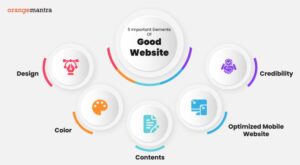
Here are the basics every good website should have:
1. Clean Layout
Keep the structure simple, organized, and free of clutter. Minimalism often works best for user experience.
2. Color Scheme
Choose 2–3 main colors that represent your brand and message. Consistent colors make your site look professional.
3. Typography
Use easy-to-read fonts and maintain consistency. Proper font sizes, spacing, and styles improve readability.
4. Mobile Responsiveness
Ensure your website adapts seamlessly to any screen size. Mobile-first design is a must in 2025.
5. Fast Loading Speed
Compress images, use proper formats, and avoid unnecessary heavy elements to keep your site quick and smooth.
6. Clear Call-to-Action (CTA)
Buttons like “Buy Now,” “Sign Up,” or “Contact Us” should be prominent and guide users toward your goals.
7. Consistent Branding
Your logo, colors, and messaging should align with your overall brand identity. This builds trust and recognition.
🛠️ Website Design Tools for Beginners
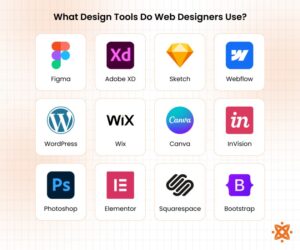
You don’t need to be a coding expert to design a professional-looking website. These beginner-friendly tools make website creation easy:
WordPress
Ideal for blogs, business websites, and eCommerce sites. Offers thousands of themes and plugins.
Wix / Squarespace
Drag-and-drop builders perfect for beginners who want quick results.
Canva
Helps design graphics, banners, and other visual content for your website.
Figma
A powerful tool for wireframing and UI/UX mockups, useful if you want full control over design elements.
Adobe XD
Great for prototyping interactive designs before implementation.
🚀 Tips to Get Started with Website Designing
Here’s a step-by-step approach for beginners:
1. Start Small – Begin with a simple one-page website to understand the basics.
2. Seek Inspiration – Browse websites in your niche and note what works well.
3. Choose the Right Theme – Pick a responsive, visually appealing template or theme.
4. Focus on User Experience (UX) – Prioritize usability over flashy designs.
5. Test on Multiple Devices – Ensure your site works perfectly on desktops, tablets, and smartphones.
6. Iterate and Improve – Website design is ongoing. Collect feedback and make improvements regularly.
7. Optimize for SEO – Good design also considers search engine optimization, helping your site rank better.
🔚 Final Thoughts
Website designing is both an art and a skill. And the best part? You don’t need to be a tech genius to get started. With the right tools and mindset, you can create beautiful, functional websites that represent you or your brand perfectly.
So go ahead — explore, experiment, and express yourself through design. Every great website started with a simple idea — just like yours.